Transcribe Audio to
Text Online
Convert any Audio to text for free. Auto-generate transcripts and summaries in 99+ languages.


Record and transcribe audio
By continuing you agree to our Terms of Service and Privacy Policy.

How to Convert Audio to Text
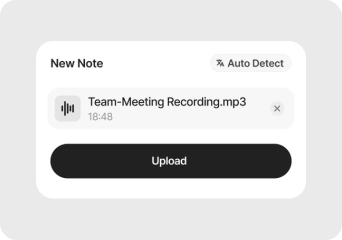
Upload any Audio File
Click on the Upload file button of the webapp or the mobile app and upload the audio.

Transcribe, Summarise & Translate
Audionotes converts your audio into clear, editable text in moments. Get accurate transcripts, structured summaries, action items, or translations across 99+ languages.

Export your text file
Save your transcript, copy it, or share it directly into your workflow. Export to docs, notes tools, or send it wherever you need it in just a few clicks.
Smarter Audio Transcription Starts Here
Transcription is effortless with Audionotes. Whether you're generating subtitles, creating SEO-optimized content, or capturing insights from meetings, our model delivers high-accuracy results in 99+ languages.
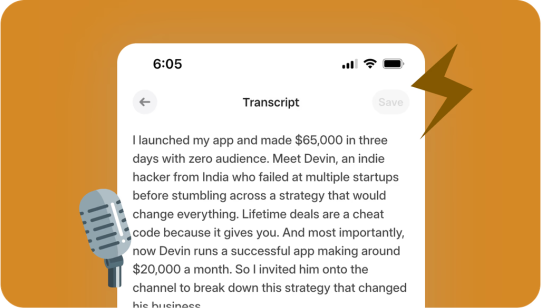
Fast Accurate Transcripts
Turn hours of audio into precise transcripts within minutes. Our AI is trained to capture details with high accuracy so you can trust every word.
Fast Accurate Transcripts
Turn hours of audio into precise transcripts within minutes. Our AI is trained to capture details with high accuracy so you can trust every word.
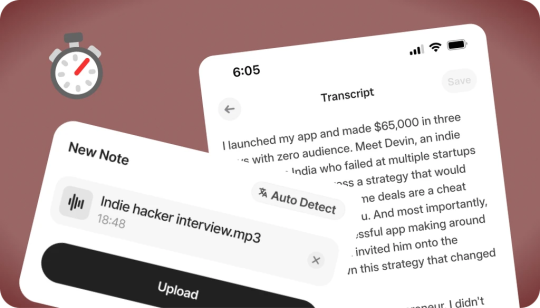
Effortless Transcription
No complicated setup, no waiting. Just upload your file, paste a link, or record directly in Audionotes and get a clean transcript instantly.
Effortless Transcription
No complicated setup, no waiting. Just upload your file, paste a link, or record directly in Audionotes and get a clean transcript instantly.
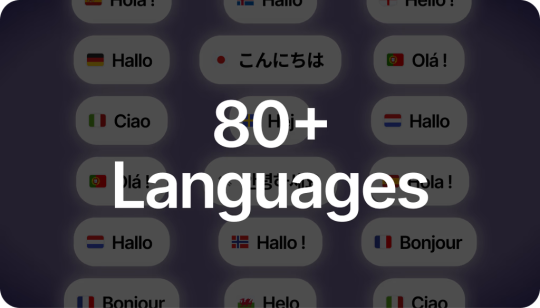
Supports 99+ Languages
From English to Spanish and beyond, Audionotes makes it easy to work across languages. Transcribe, translate, and share seamlessly worldwide.
Supports 99+ Languages
From English to Spanish and beyond, Audionotes makes it easy to work across languages. Transcribe, translate, and share seamlessly worldwide.
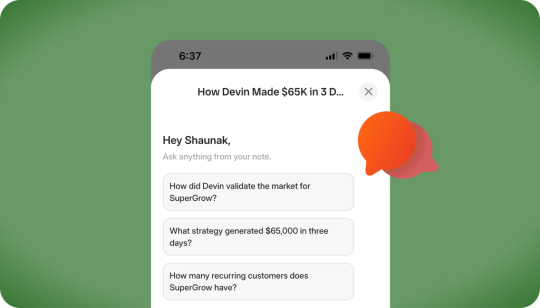
Chat with Your Transcript
Go beyond static text. Ask questions, clarify points, or extract key insights directly from your transcript, just like chatting with a colleague.
Chat with Your Transcript
Go beyond static text. Ask questions, clarify points, or extract key insights directly from your transcript, just like chatting with a colleague.
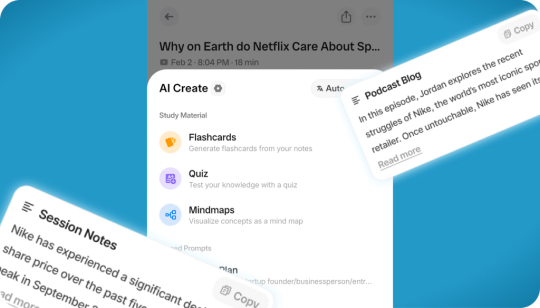
More Than Just Transcription
Don't waste time sifting through long transcripts. Get AI-generated summaries that highlight the key ideas, action points, and takeaways in seconds.
More Than Just Transcription
Don't waste time sifting through long transcripts. Get AI-generated summaries that highlight the key ideas, action points, and takeaways in seconds.
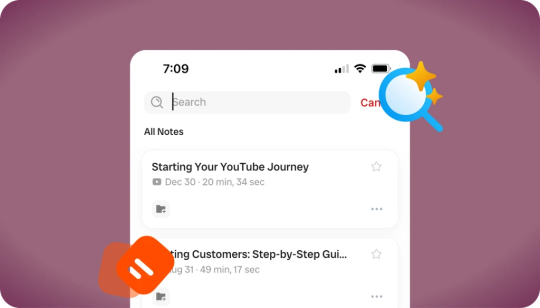
Searchable Transcripts
Never lose track of important details again. Every transcript is fully searchable, so you can jump to the exact word, phrase, or section you need.
Searchable Transcripts
Never lose track of important details again. Every transcript is fully searchable, so you can jump to the exact word, phrase, or section you need.
Loved by 200K+ Happy Users

Makes life SO much easier. They've really improved the interface to make life easier and they listen to their users to make the product better. Recording my random thoughts and organizes them so I can be productive. Love this.
 Paul Colaianni
AudioNotes is truly a game-changer! As a marketing consultant, I often find myself brainstorming ideas alone, and this app has become my go-to companion. It effortlessly captures and organizes my thoughts, ensuring that not a single idea, whether good or bad, slips away!
 Alexandre
Really excited with AudioNotes! I can shower, miss a thought and would like how we can also transcribe the audios of some conferences that I have stored on my phone… Very satisfied with the support of AudioNotes that quickly resolved.
 Damian Larrañaga
The AudioNotes.app team is very responsive and customer service is top notch!! The ability to summarize voice notes so elegantly has made my workflow even more efficient than I could have ever hoped. This is an amazing tool for journaling as well.
 Cydney
AudioNotes has become an essential part of my creative process. It is just so quick and easy to ramble into my phone and then get a version of my ideas that is clear and usable immediately.
 Adam Davidson
Audio Notes revolutionizes note-taking and content creation, making it a game-changer for professionals, students, content creators, and anyone looking to boost their productivity. Keep up the work! I hope to see more exciting features.
 Andy Lim
Makes life SO much easier. They've really improved the interface to make life easier and they listen to their users to make the product better. Recording my random thoughts and organizes them so I can be productive. Love this.
Paul ColaianniAudioNotes is truly a game-changer! As a marketing consultant, I often find myself brainstorming ideas alone, and this app has become my go-to companion. It effortlessly captures and organizes my thoughts, ensuring that not a single idea, whether good or bad, slips away!
AlexandreReally excited with AudioNotes! I can shower, miss a thought and would like how we can also transcribe the audios of some conferences that I have stored on my phone… Very satisfied with the support of AudioNotes that quickly resolved.
Damian LarrañagaThe AudioNotes.app team is very responsive and customer service is top notch!! The ability to summarize voice notes so elegantly has made my workflow even more efficient than I could have ever hoped. This is an amazing tool for journaling as well.
CydneyAudioNotes has become an essential part of my creative process. It is just so quick and easy to ramble into my phone and then get a version of my ideas that is clear and usable immediately.
Adam DavidsonAudio Notes revolutionizes note-taking and content creation, making it a game-changer for professionals, students, content creators, and anyone looking to boost their productivity. Keep up the work! I hope to see more exciting features.
Andy LimBuilt for Anyone Who Works with Words
Accurate Transcripts and AI-Powered Notes for Content Creators, Professionals, and Students

Content Creators & Podcasters
Transcribe your episodes into blogs, captions, and show notes - boost SEO and repurpose content with ease.

Writers & Journalists
Turn interviews and field recordings into clean, searchable text - capture every quote, every insight.

Educators & Students
Record lectures, study sessions, or tutorials and convert them into notes, summaries, and revisions - fast and distraction-free.

Corporate Teams & Event Organizers
Get transcripts of meetings, webinars, or conferences - perfect for documentation, follow-ups, and sharing key takeaways.

Legal & Healthcare Professionals
Save time on dictation, documentation, and compliance - with accurate, time-stamped transcripts you can trust.

Captioners, Subtitlers & Translators
Convert audio into accurate captions and multilingual subtitles - ideal for accessibility, localization, and global content delivery.
Don't Type It. Just Talk.
We'll handle the rest. Convert your voice to text in seconds.
Start transcribing ›Working with raw audio?
Use Audionotes as your audio to text converter, then use these guides for voice memos, iPhone dictation, AI transcription, and transcription app comparisons.
Plans & Pricing
Start free, upgrade when you need more. One Pro plan, everything included — no hidden fees.
What's Included
- Unlimited Voice Notes (1 min/note)
- Unlimited Text Notes
- Transcripts & Summaries
- 99+ Languages
- Search & Organize Notes
- iPhone, Android, Web & Mac (beta)

Everything you need to capture, organize, and act on your ideas — unlimited.
Get StartedWhat's Included
- Unlimited Voice Notes
- Unlimited File Uploads
- Notes from Images
- Notes from YouTube Videos
- Chat with Notes
- Unlimited Transcripts & Summaries
- Unlimited AI Generations
- Custom Prompts
- Notion, Zapier & Webhooks
For teams of 5+ who need dedicated support, custom integrations, and volume pricing.
Contact UsWhat's Included
- Everything in Pro
- Centralized Billing
- Priority Support
Recording size and file size limits may apply owing to device limitations and fair usage policy.
Comparing transcription tools?
See how Audionotes compares with audio transcription and desktop transcription alternatives.
Learn How to Take Smarter Notes
Explore blogs, guides, tips, and real use cases on AI transcription and note-taking.
![Note-Taking vs Note-Making: Key Differences [2026]](/_next/image?url=%2Fblog%2Fcovers%2Fdifference-between-note-taking-and-note-making.avif&w=3840&q=75&dpl=dpl_kb6Pb8sTgpHC4WmicDYspvbTeRVb)
Note-Taking vs Note-Making: Key Differences [2026]
Note-taking focuses on recording ideas as they happen, while note-making transforms those ideas into personal understanding. Each plays a vital role in learning, one for speed and accuracy, the other for analysis and reflection.

Best Personal Knowledge Management Tools (2026)
A note in your phone, a tab in your browser, a screenshot buried in your gallery. Over time, information piles up but stays disconnected. That is exactly why PKM tools are blowing up right now.
![Best Note-Taking Apps for Android in 2026 [Top 10]](/_next/image?url=%2Fblog%2Fcovers%2Fbest-note-taking-apps-for-android.avif&w=3840&q=75&dpl=dpl_kb6Pb8sTgpHC4WmicDYspvbTeRVb)
Best Note-Taking Apps for Android in 2026 [Top 10]
Taking notes on your phone has become a daily habit for many of us, whether it's jotting down ideas, saving a shopping list, or keeping track of meeting points. With so many apps available on Android, choosing the right one can feel overwhelming.
![Best Note-Taking Apps for iPhone in 2026 [Ranked]](/_next/image?url=%2Fblog%2Fcovers%2Fbest-notes-apps-iphone.avif&w=3840&q=75&dpl=dpl_kb6Pb8sTgpHC4WmicDYspvbTeRVb)
Best Note-Taking Apps for iPhone in 2026 [Ranked]
If you're searching for the best notes app for iPhone, you're not alone. With so many apps available, finding one that balances speed, organization, cloud sync, and smart AI features can be tricky.
![Best Transcription Apps for iPhone in 2026 [Top 8]](/_next/image?url=%2Fblog%2Fcovers%2Fbest-transcription-apps-iphone.avif&w=3840&q=75&dpl=dpl_kb6Pb8sTgpHC4WmicDYspvbTeRVb)
Best Transcription Apps for iPhone in 2026 [Top 8]
In this blog, we explore what transcription technology is, the top 6 transcription apps for iPhone, the benefits of transcription apps, and finally, the criteria for choosing the right transcription app.
![What Is AI Transcription? How It Works [2026 Guide]](/_next/image?url=%2Fblog%2Fcovers%2Fwhat-is-ai-transcription.avif&w=3840&q=75&dpl=dpl_kb6Pb8sTgpHC4WmicDYspvbTeRVb)
What Is AI Transcription? How It Works [2026 Guide]
We rely on conversations to move ideas forward, whether it's a brainstorming session, a casual chat, or an important meeting. But spoken words are fleeting. Once they're gone, they're often gone for good.

Best Transcription Apps for Audio to Text (2026)
Whether you're a journalist transcribing interviews, a student converting lecture notes, or a businessperson documenting meetings, the ability to quickly and accurately convert audio to text is transformative.

Best Dictation Software in 2026
With speech recognition accuracy improving and AI-powered models reducing error rates, dictation software is now reliable enough for everyday work. After testing leading tools, we've shortlisted the best dictation software options to help you choose the right one for your workflow.
![Best Free Note-Taking Apps for iPad in 2026 [Top 6]](/_next/image?url=%2Fblog%2Fcovers%2Ffree-note-taking-apps-ipad.avif&w=3840&q=75&dpl=dpl_kb6Pb8sTgpHC4WmicDYspvbTeRVb)
Best Free Note-Taking Apps for iPad in 2026 [Top 6]
Below, we've rounded up the list of best note-taking apps for iPad, covering options features & price for students, professionals, creatives, and anyone who wants a smarter, more effortless way to take notes.
![Best Dictation Apps in 2026 [Tested & Ranked]](/_next/image?url=%2Fblog%2Fcovers%2Fbest-dictation-apps-for-iphone.avif&w=3840&q=75&dpl=dpl_kb6Pb8sTgpHC4WmicDYspvbTeRVb)
Best Dictation Apps in 2026 [Tested & Ranked]
Typing on your iPhone isn't always convenient, especially when your hands are full or you're in the middle of something. That's where dictation apps come in. They let you speak your thoughts out loud and turn them into text instantly.

Transcription vs Translation: Key Differences
Transcription and translation are often mixed up, especially when people are working with audio notes, lectures, videos, or multilingual content. They sound similar, but they solve entirely different problems.
Note-Taking vs Note-Making: Key Differences [2026]
Note-taking focuses on recording ideas as they happen, while note-making transforms those ideas into personal understanding. Each plays a vital role in learning, one for speed and accuracy, the other for analysis and reflection.
Best Personal Knowledge Management Tools (2026)
A note in your phone, a tab in your browser, a screenshot buried in your gallery. Over time, information piles up but stays disconnected. That is exactly why PKM tools are blowing up right now.
Best Note-Taking Apps for Android in 2026 [Top 10]
Taking notes on your phone has become a daily habit for many of us, whether it's jotting down ideas, saving a shopping list, or keeping track of meeting points. With so many apps available on Android, choosing the right one can feel overwhelming.
Best Note-Taking Apps for iPhone in 2026 [Ranked]
If you're searching for the best notes app for iPhone, you're not alone. With so many apps available, finding one that balances speed, organization, cloud sync, and smart AI features can be tricky.
Best Transcription Apps for iPhone in 2026 [Top 8]
In this blog, we explore what transcription technology is, the top 6 transcription apps for iPhone, the benefits of transcription apps, and finally, the criteria for choosing the right transcription app.
What Is AI Transcription? How It Works [2026 Guide]
We rely on conversations to move ideas forward, whether it's a brainstorming session, a casual chat, or an important meeting. But spoken words are fleeting. Once they're gone, they're often gone for good.
Best Transcription Apps for Audio to Text (2026)
Whether you're a journalist transcribing interviews, a student converting lecture notes, or a businessperson documenting meetings, the ability to quickly and accurately convert audio to text is transformative.
Best Dictation Software in 2026
With speech recognition accuracy improving and AI-powered models reducing error rates, dictation software is now reliable enough for everyday work. After testing leading tools, we've shortlisted the best dictation software options to help you choose the right one for your workflow.
Best Free Note-Taking Apps for iPad in 2026 [Top 6]
Below, we've rounded up the list of best note-taking apps for iPad, covering options features & price for students, professionals, creatives, and anyone who wants a smarter, more effortless way to take notes.
Best Dictation Apps in 2026 [Tested & Ranked]
Typing on your iPhone isn't always convenient, especially when your hands are full or you're in the middle of something. That's where dictation apps come in. They let you speak your thoughts out loud and turn them into text instantly.
Transcription vs Translation: Key Differences
Transcription and translation are often mixed up, especially when people are working with audio notes, lectures, videos, or multilingual content. They sound similar, but they solve entirely different problems.
Frequently Asked Questions

Save time and stay organised with Audionotes
Without Audionotes


With Audionotes


Explore other ways to use Audionotes
Many users start with one workflow and discover others.
Browse a related use case below.
Get the Audionotes app today
For mobile
Scan the QR code below

Still not sure thatAudionotes.app isright for you?
Let ChatGPT, Claude, or Perplexity help you to choose.
Click a button and see what your favourite AI says about Audionotes.app.


