Connect Audionotes
with Webhooks

Push every new Audionotes note straight to your own HTTP endpoint — full transcript, AI summary, and metadata in one JSON payload. The fastest, lowest-latency way to wire Audionotes into custom backends.

What you can build

Pipe into your own database

Receive notes directly into Postgres, Supabase, MongoDB, Firestore, or any other store you control. Full text, summaries, and metadata in a single payload — no scraping or polling.

Trigger custom backends

Forward notes to internal services that handle compliance scrubbing, FHIR formatting, CRM enrichment, or anything else your stack needs. Webhooks fire as soon as the note finishes processing.

Build your own UI on top

Storing notes in your own system means you can render them anywhere — embedded in your client portal, surfaced in your team's dashboard, or piped into a search index.

Lower latency than Zapier

A direct webhook hits your endpoint within seconds of the note finishing. Use Zapier if you want no-code orchestration; use webhooks when latency matters or you'd rather own the integration.

How to Connect Audionotes
with Webhooks

Log in to Audionotes

  • Open Audionotes Web and log in to your account.
  • From the left sidebar, go to Integrations.
  • Click Connect on the Webhook integration card.

Step 1: Enter Your Webhook URL

Paste your webhook URL in the field provided. Make sure your webhook URL is public and correct.
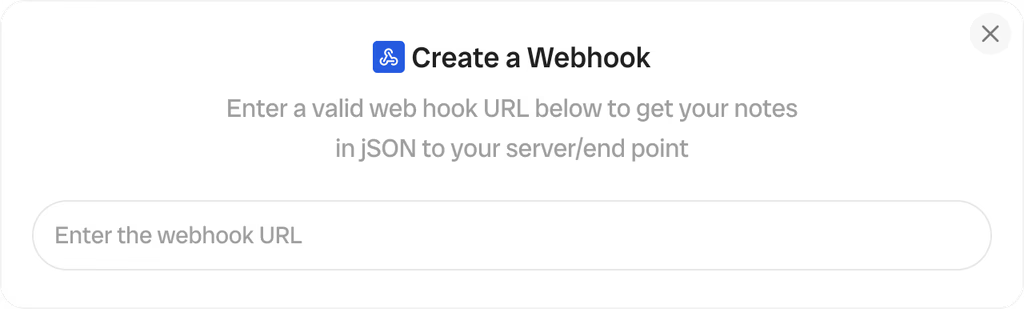
Step 1 — Enter Webhook URL

Step 2: Connect and Finish Setup

Click Connect. Once connected, every new note you create will be sent to your webhook in the following JSON format:

{
  "noteId": "string",
  "createdAt": "string",
  "noteType": "string",
  "title": "string",
  "transcript": "string",
  "content": "string"
}
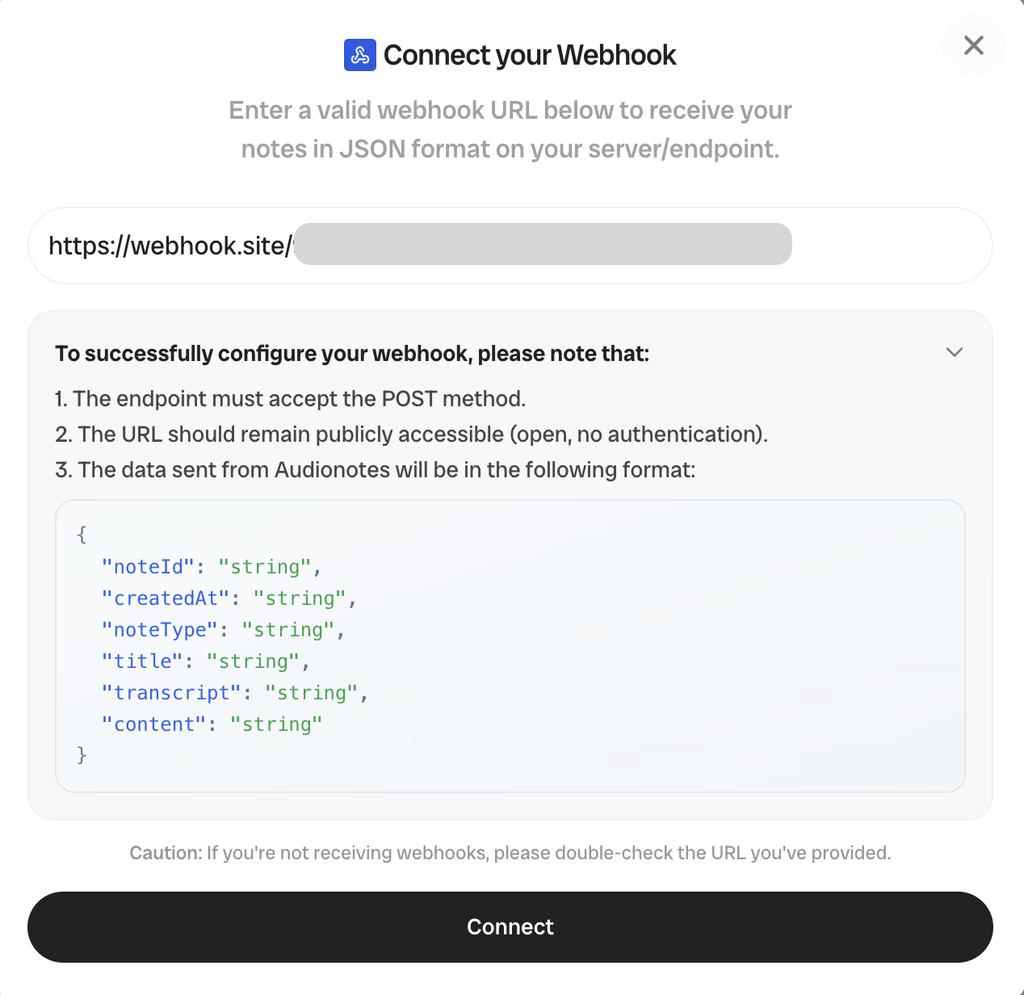
Step 2 — Connect Webhook

Frequently Asked Questions

The webhook posts a JSON payload to any HTTPS endpoint you configure each time a new note is created in Audionotes. Use it to integrate Audionotes with internal tools, custom dashboards, databases, or workflow engines that don't already have a Zapier connector.

The payload is a JSON object with the note title, full transcript, AI summary, action items array, tags, source type (voice / upload / YouTube / WhatsApp), recording duration in seconds, ISO 8601 created_at timestamp, and a unique note_id. Content-Type is application/json and the body is gzip-compressible.

In Audionotes, go to Settings → Integrations → Webhooks. Paste your endpoint URL, optionally add custom headers (e.g. Authorization), then send a test ping to verify the endpoint accepts the payload. Save and you are done.

Each webhook can carry custom headers you specify (e.g. an API key or bearer token), so the receiving server can verify the request came from Audionotes. We recommend a long random secret in an Authorization header that your endpoint validates before processing.

Audionotes retries failed deliveries up to 5 times with exponential backoff (1m, 5m, 30m, 2h, 12h). After the final retry, the delivery is marked failed and surfaced in the Webhooks dashboard so you can replay it manually once the endpoint is back online.

Webhooks are a Pro plan feature. The Free plan supports manual export instead — you can copy a JSON-formatted note from the app or download it from the dashboard. See all integrations.

A webhook lets one app automatically send real-time data or notifications to another app when a specific event happens. Audionotes uses webhooks to send your notes to your webhook endpoint each time you create a new note.

You'll need a server with an endpoint that can receive and process webhook requests.

No. Only notes created after connecting to webhooks will be sent to your endpoint.

Double-check that you entered the correct webhook URL. Ensure your webhook endpoint is public and accessible.

No. The webhook structure is fixed, and you will always receive data in the JSON format documented above.

We're Here to Help

Explore FAQs, guides, and integrations, all designed to keep you supported every step.

Save time and stay organised with Audionotes

Without Audionotes

Missed details after meetings
Hours spent typing and organizing
Scattered files and voice notes
Stress of catching up later
Ideas lost between platforms

With Audionotes

Every word captured with AI note taking
Notes auto-generated and summarized in minutes
All notes searchable in one organised workspace
Instant transcripts, summaries, and action points
Connected notes synced across your tools
Try Audionotes

Get the Audionotes app today

For desktop

Use Audionotes on web

Continue on web
Download Extension
Coming Soon

For mobile

Scan the QR code below

QR code to download Audionotes mobile app

Still not sure thatAudionotes.app isright for you?

Let ChatGPT, Claude, or Perplexity help you to choose.
Click a button and see what your favourite AI says about Audionotes.app.