



Audionotes vs AudioPen

Audionotes vs AudioPen

Choose Audionotes if you want stronger coverage across recording, summarizing, storing, and exporting notes. Choose AudioPen if the main job is converting rough dictation into usable written text.

Audionotes app v Audiopen

Key differences in 30 seconds


Audionotes

Audiopen

Best for

Capturing thoughts in any format and turning them into organised, usable notes.

Fast dictation and turning spoken thoughts into text

Starting price

$19.99–$29.99 (Monthly), $89.99–$129.99 (Annual)

$99.00 (Annual)

Free Plan

Yes, unlimited number of notes with 1 minute recording limit

Yes, free tier available with usage limits

App Store rating

4.8/5

4.50/5

First released

January 2024

September 2024

Inputs

Audio, Video, Image, YouTube, Text

Audio, File Upload, Text

Exports

Markdown, Text, Audio, Webpage

Markdown, TXT

Platforms

iPhone, iPad, Android, Web

iPhone/iPad, Android, Web, Chrome extension, Desktop

Integrations

Notion, Zapier, WhatsApp

Gmail, Slack, Notion, Google Docs

App Languages

English, Español, Deutsch

English

Privacy

End-to-end encryption and GDPR listed

Privacy details are limited in public documentation

Choose Audionotes if...

Multiple upload options

You want images, video, YouTube, and richer note organization

Powerful export options

You need stronger exports like PDF and Word

you want broader reuse beyond typing into other apps

You want better fit for meetings, lectures, and structured notes

Full-featured AI notes app

You want a broader AI note-taking app rather than a voice-to-text utility

Choose Audiopen if...

You think out loud and want raw speech cleaned into usable prose

You care more about styled writing output than meeting workflows

You want a lightweight tool for voice-to-text and rewriting

You do not need speaker diarization or meeting bots

What users are saying

We collected the most recent App Store reviews for each product and independently coded every review by theme: accuracy, reliability, pricing, and usability. Quoted reviews were selected for typicality, not extremity.

Audinotes logo

Audionotes has found a strong audience among people who think out loud and want something useful on the other end of a recording. Users describe it as genuinely changing how they capture thoughts, from daily to-do lists to quick reminders that don't get lost. Cross-device sync is a real strength here: something captured on your phone shows up on the web instantly, and offline mode means it works even without a connection. The app is consistently noted for being dependable, with the dev team's responsiveness reinforcing that reliability over time. The main friction some users mention is preferring more control over when the AI processes a note.

TOP PRAISE

"Audionotes has been an absolute game changer, it seamlessly converts thoughts into organized and actionable notes, saving me so much time. The user-friendly interface makes it simpler to use the app."

COMPLAINT

"Want to love this more but I don't want it to use AI until I choose, that option isn't there. The simple summary made up a lot of 'informational' text I don't need, and it creates a delay."

Audiopen Logo

Audiopen is generally liked for what it's trying to do: turn spoken thoughts into organized, written text. Users who stick with the app tend to value how well it handles rambling, nonlinear speech and turns it into something usable, and some find it a real game-changer for content creation. That said, processing times can be frustratingly slow, which makes it tough to rely on for quick captures. Authentication issues have also locked some users out entirely, with login codes never arriving. The developer is praised for being responsive, though the app appears to have some rough edges to address before it feels dependable for a wider audience.

TOP PRAISE

"The freedom to speak my ideas and have a tool that turns my raw and often rambling thoughts into clear text is a game changer. I'm grateful to have found AudioPen on ProductHunt when it first launched."

COMPLAINT

"Useless: the first thing I have to do to do anything in the app is enter my email then put in a code from that email. Code never arrives no matter how many times I try. Can't use the app at all."

Real-world benchmarks

30-minute two-speaker English conversation with moderate background noise, tested March 2026 by the Audionotes team. Transcription accuracy scored by a human evaluator; summary quality scored by an LLM judge against a fixed rubric; recording reliability derived from App Store review patterns. Full methodology and scoring rubrics.

MAX RECORDING

180m

Audionotes

15m

Audiopen

TRANSCRIPTION

9/10

Audionotes

7/10

Audiopen

SUMMARY QUALITY

9/10

Audionotes

8/10

Audiopen

OFFLINE CAPTURE

Yes

Audionotes

No

Audiopen

SPEAKER DIARIZATION

Yes

Audionotes

No

Audiopen

RECORDING RELIABILITY

8/10

Audionotes

Undetermined

Audiopen

Takeaway: Audionotes and AudioPen matched on transcription accuracy (9/10 each); Audionotes edged ahead on summary quality (9/10 vs 8/10).

Feature-by-feature comparison

Recording

Audinotes logo

AudioPen is a voice-only input tool focused on converting rambling, unstructured speech into clean, polished prose. It does not accept images, YouTube links, uploaded audio files, or text notes, the workflow is specifically voice-in, rewritten-text-out, making it highly focused but narrow in scope.
Winner : Audionotes.

Transcription

Audinotes logo
Audiopen Logo

AudioPen does not preserve a verbatim transcript by default, it rewrites your speech into polished prose rather than transcribing word-for-word. If you need an accurate record of what was said (for a meeting, lecture, or interview), Audionotes' transcription-first model is the better fit.
Winner: Depends on workflow

Summaries

Audinotes logo
Audiopen Logo

AudioPen's "summary" is effectively a rewrite, it restructures your spoken thoughts into coherent paragraphs in your chosen writing style or tone. Audionotes generates structured summaries with key points, action items, and optionally a mind map, which is more useful when you need to extract information rather than clean up prose.
Winner : Depends on Use case

Chat and reuse

Audinotes logo

AudioPen routes notes directly to Gmail, Slack, Notion, and Google Docs with one tap, no copy-pasting between apps, which is its key reuse advantage for quick capture and publish. Audionotes supports AI chat for asking follow-up questions and generating new outputs from notes, but does not have the same one-tap publish-to-inbox shortcuts.
Winner: Audionotes

Organization

Audinotes logo

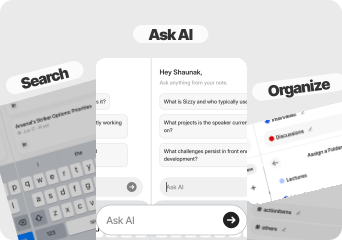
AudioPen's library is a list of your rewritten voice notes with no folders, tags, or full-text search across all notes. Audionotes provides full-text search, tags, and folders, more useful if you are building a personal knowledge base rather than capturing and immediately forwarding individual thoughts.
Winner: Audionotes
Uploads

Audinotes logo
Audiopen Logo

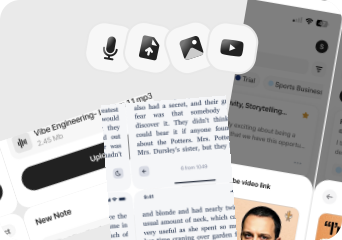
AudioPen does not support file uploads; you can only input audio by recording live in the app. Audionotes accepts audio file uploads, YouTube links, images, and text, making it far more useful for processing content that already exists rather than only what you record in the moment. Winner: Depends on input type

Export

Audinotes logo

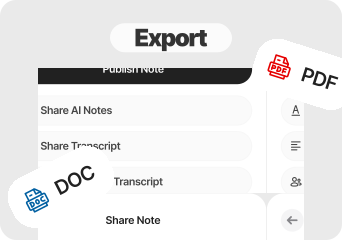
AudioPen's output is clean prose text, which you can copy or push directly to Gmail, Slack, Notion, or Google Docs from within the app. Audionotes exports as Markdown, Text, PDF, and Word, plus a shareable webpage option, more formats for documentation but fewer direct-publish shortcuts.
Winner: Audionotes

Online Meetings

Audinotes logo
Audiopen Logo

AudioPen is not designed for meetings and has no meeting bot or calendar integration. Audionotes also has no bot, but its transcript and summary model makes manually recorded meeting audio far more usable than AudioPen's prose-rewrite format for a post-call note workflow. Winner: Depends on workflow

Integrations

Audiopen Logo

AudioPen connects directly to Gmail, Slack, Notion, and Google Docs, a tight, high-value set of outbound routes for professionals who want to draft and send without leaving the app. Audionotes covers Notion, Zapier, and WhatsApp; it lacks the Gmail and Slack direct-push that AudioPen offers for immediate message composition.
Winner: AudioPen

Privacy & Security

Audinotes logo

AudioPen's privacy documentation is limited relative to enterprise expectations; it is a solo-developer product without published compliance certifications. Audionotes is GDPR-compliant with end-to-end encryption, offering a more documented security posture for professional or business use.
Winner: Audionotes

Best pick by persona

Find your workflow, find your tool.

Writer dictating first drafts

Writers who dictate first drafts

Choose : Audiopen
Why? : AudioPen rewrites rambling speech into polished prose in your chosen style, ideal for writers who want to think aloud and get clean copy back.

Professionals who draft long emails or documents by voice

Professionals who draft emails or Slack messages by voice

Choose : Audiopen
Why? : AudioPen pushes output directly to Gmail, Slack, Notion, or Google Docs with one tap, no copy-pasting required to get the text where it needs to go.

Students and lecture note-takers

Students and lecture note-takers

Choose : Audionotes
Why? : AudioPen has no transcript, no mind map, and no structured summary, only rewritten prose. Audionotes produces transcripts, summaries, mind maps, flashcards, and quizzes from the same recording.

Person Taking Notes

Meeting note-takers

Choose : Audionotes
Why? : AudioPen has no speaker diarization, no timestamps, and no meeting-format output. Audionotes transcribes recorded audio into a usable meeting summary.

Content creators working across media types

Content creators working across media types

Choose : Audionotes
Why? : Audionotes ingests YouTube, images, and uploaded files, AudioPen only processes voice recorded live in the app.

Personal knowledge base builders

Personal knowledge base builders

Choose : Audionotes
Why? : AudioPen has no searchable note library, no folders, and no tagging, every note is a one-off rewrite. Audionotes stores everything with full-text search.

Founders and indie makers

Founders and indie makers

Choose : Audionotes
Why? : Founders need more than a polished rewrite — they need client call summaries, a searchable library of decisions and ideas, structured meeting outputs, and Notion routing. AudioPen handles one-off prose; Audionotes handles the full capture-to-action loop across a busy week.

Content creators

Content creators

Choose : Depends
Why? : AudioPen wins for speed: voice dump to clean draft in one tap, pushed straight to Gmail, Notion, or Google Docs. Audionotes wins if the workflow involves YouTube videos, interview recordings, or building a library of reference material to draw from. If all you need is fast text from voice, AudioPen is enough. If you want one place for all your source material, Audionotes is more useful.

Daily journaling

Daily journalers

Choose : Audiopen
Why? : AudioPen rewrites voice into flowing, readable prose in a style you choose — closer to how a journal entry should read than Audionotes' structured bullet summaries. If the goal is a personal record that reads well, not a note to act on, AudioPen's rewriting model fits the use case better.

Pricing and value

Audinotes logo

$8.33

/month

Billed Annually - $99.99/year

  1. Covers transcription, summaries, action items, mind maps, AI chat, multi-format export, and a searchable library.

  2. Better value if you want one subscription for more than dictation cleanup.

  3. Audionotes is better when you need a fullerAI notes system, not just voice-to-text cleanup.

  4. Its biggest strengths in this comparison are broader inputs, better exports, and stronger note organization

Audiopen Logo

$99

/year

~$8.25/month equivalent

  1. Focused and affordable if you only need voice-to-prose and direct email/Slack publishing. Lower price point for a narrower feature set.

  2. AudioPen is better when the specific pain point is verbal ideation rather than note management.

  3. It is attractive for brainstorming, journaling, and first-draft writing.

Known limitations

No tool is perfect. Here's what to expect.

Audinotes logo
  • Free tier caps recordings at 1 minute

  • More features means a slightly steeper learning curve

  • Requires internet for transcription and summaries

  • No built-in journaling or private diary-style layout

Audiopen Logo
  • Slow processing is a repeated complaint in reviews, which works against the app’s promise of fast idea capture.

  • Authentication issues have blocked some users from even accessing the app.

  • The product is narrower than Audionotes in both inputs and downstream workflows.

  • It is best thought of as a dictation-cleanup utility, not a complete meetings or knowledge workflow.

Key takeaway: AudioPen cleans up speech quickly; Audionotes takes the same input further, with more formats and more to do with the output.

Change from Audiopen to Audionotes

Switching from Audiopen to Audionotes

Users usually move from AudioPen to Audionotes when they want their captured thoughts to live inside a fuller system instead of stopping at cleaned-up text.

Switch if you feel boxed into AudioPen’s narrower workflow and want one tool to handle ideas, meetings, lectures, personal notes, and mixed-media note creation too. See also: best apps to summarise voice recordings. Also evaluating Audionotes vs Voicenotes or Audionotes vs SpeechNotes? Those comparisons cover similar trade-offs.

FAQ's

Is Audionotes better than AudioPen?

For most workflows, yes. AudioPen does one thing: it takes a rambling voice note and rewrites it as clean prose, then routes that text to Gmail, Slack, Notion, or Google Docs. If you are a writer who thinks aloud and wants drafts delivered straight to your tools, that is genuinely compelling. What AudioPen does not do: keep a searchable library, produce transcripts, handle uploads or YouTube, generate structured summaries, or give you an AI chat layer. Audionotes does all of that, at roughly double the price. The choice comes down to whether you need a smart drafting tool or a full notes platform.

Can Audionotes replace AudioPen for voice writing?

For most voice workflows, yes. Audionotes transcribes, summarises, and stores notes. The one thing AudioPen does that Audionotes does not is clean a rambling voice note into a single polished paragraph, so if that specific output format is the goal, AudioPen still has a use case.

Which app is better for journaling?

Neither is purpose-built for journaling. For private voice journaling, Voicenotes is the better fit. Both Audionotes and AudioPen are more productivity-oriented tools.

Does AudioPen store and organise notes over time?

AudioPen stores your notes in a simple chronological list but has no tagging, search-across-all-notes, or folder structure. If building an organised library you can search and reference over time matters, Audionotes handles that significantly better.

Is Audionotes free?

Yes. Unlimited number of notes with 1 minute recording limit. See paid plan features →

Is AudioPen free?

Yes. AudioPen has a free tier available with usage limits.

Which app handles longer voice recordings better?

Audionotes. AudioPen is optimised for quick captures under a few minutes. Audionotes handles longer recordings on paid plans with the same summary output.

Which tool has better integrations?

Depends on the workflow. AudioPen connects directly to Gmail, Slack, Notion, and Google Docs for one-tap publishing. Audionotes connects to Notion, Zapier, and WhatsApp, and exports to Obsidian. If Gmail and Slack direct-push are essential, AudioPen is ahead; if Zapier automation and WhatsApp routing matter more, Audionotes wins.

What are the best AudioPen alternatives in 2026?

AudioPen is a voice-to-polished-writing tool, optimised for founders and creators who think out loud and want clean prose output quickly. The closest alternatives: Audionotes produces summaries and structured notes rather than flowing prose, making it better for operational capture than writing assistance. Whisper Memos is a lighter option for quick transcription with basic cleanup. Reflect and Notion AI handle voice input with note-taking context. If AudioPen's strength for you is transforming rambling voice into clean text for blog posts or updates, Audionotes partially covers it but the output format differs. If the need is broader note capture with searchable archives, Audionotes is the stronger replacement.

Which is the cheapest AI voice note app in 2026?

AudioPen starts at $9.99/month with a free trial. Audionotes starts at $9/month (annual) and includes a free plan with unlimited notes up to 1 minute each. Whisper Memos is around $4.99/month for basic transcription. For the lowest paid tier with the most AI processing included, Audionotes' annual plan at $9/month covers transcription, summaries, action items, and mind maps. For users on a budget who need only occasional AI cleanup, AudioPen's free tier handles short clips without a subscription.

What is the best AI app for converting voice notes into written content in 2026?

AudioPen is purpose-built for this: it takes rambling voice input and rewrites it as clean prose in a style you can train over time. Audionotes produces summaries and structured notes rather than prose rewrites, making it better for meeting capture and operational notes than for content creation. For founders writing investor updates or newsletters by voice, AudioPen's output format is more directly usable. For teams or individuals who want voice-to-structured-notes with searchable archives, Audionotes. For voice-to-publishable-content, AudioPen remains the most specialised tool.

Can I switch from AudioPen to Audionotes?

Yes. AudioPen lets you export note text directly. Copy or export those cleaned transcripts and import them into Audionotes. You lose AudioPen's prose-style rewrite format but gain a searchable library, AI chat, and richer output options. Since AudioPen does not store audio, re-upload original recordings to Audionotes if you want transcription and summaries. If you're also evaluating Audionotes vs Voicenotes, that page covers another voice-first tool with a different philosophy.

Bottom-line verdict

Choose Audionotes if you want a note library that grows, searchable, organised across input types, producing structured outputs you can export and revisit. AudioPen is a great tool for one specific job; Audionotes is the better platform for building a knowledge base from voice.

Choose AudioPen if your main use case is turning a messy spoken thought into clean, publishable prose that routes straight to Gmail, Slack, or Notion without any editing. It is remarkably focused and fast at that one thing.

Final recommendation: Pick AudioPen if the output you want is polished text delivered directly to your inbox or Slack channel and you will never need to find that note again. Pick Audionotes if you want the capture to build into something, a library, a knowledge base, structured outputs you return to.

Sources

How We Evaluated

We evaluated each product using a mix of official product documentation, pricing pages, privacy and security materials, app store listings, public review data, and hands-on testing where available. We prioritized directly verifiable claims and avoided filling gaps with assumptions.

Where possible, we compared products across the same criteria, including pricing, feature depth, export options, integrations, platform coverage, privacy controls, and review sentiment. If a detail was unclear or not publicly documented, we marked it as unspecified rather than guessing.